First-Party UX Event Tracking
Define a small UX event schema, collect it across web and app surfaces, and measure product changes against a stable baseline.
Collect only the events and fields your product question requires. Anonymous and identified data need separate consent and retention rules.
UX tracking starts with a product question, not a list of every clickable element. Define the decision you need to make, instrument the few events that answer it, and verify the payload before building a dashboard.
Turn a question into an event
Suppose the question is: “Do people abandon checkout after seeing shipping cost?” A compact schema might use:
{
  "name": "checkout_step_viewed",
  "data": {
    "step": "shipping",
    "checkout_version": "v3",
    "surface": "web"
  }
}
Add a stable event ID and timestamp in the collection layer. Do not place form values or personal data in generic UX parameters.
Instrument actions, not DOM details
Useful events describe user intent:
search_submittedproduct_comparedcheckout_step_viewedform_error_shownpurchase_confirmed
CSS classes and button positions change often. A business event such as trial_started is easier to keep stable than green_button_clicked.
Add only useful context
Parameters can include the product surface, flow version, step name, error category, experiment assignment, and consent state. Keep names consistent across web and mobile so analysts can compare the same action without rebuilding the query.
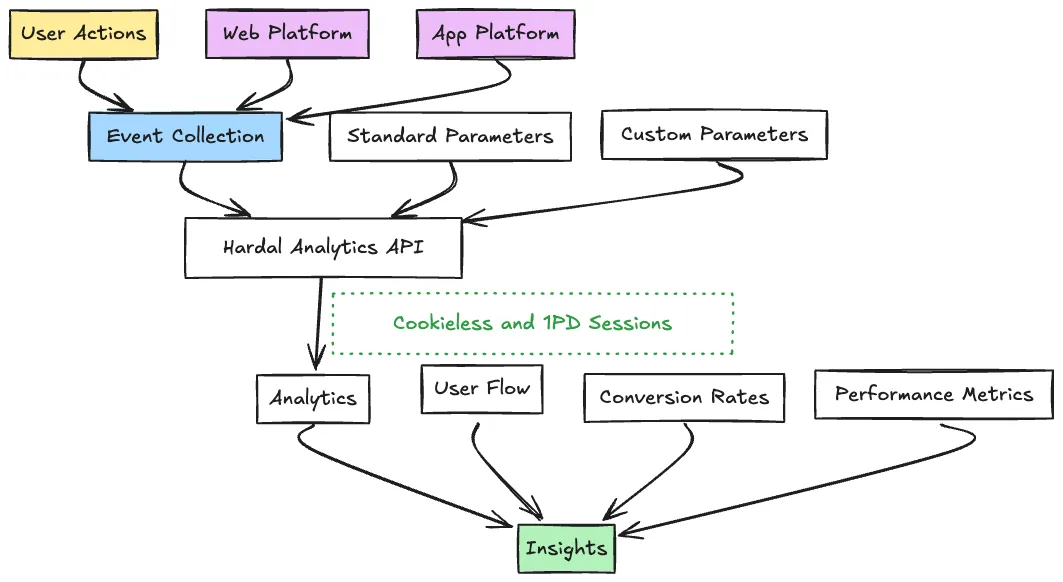
UX tracking data structure
Validate before analysis
- Write the event contract and allowed parameters.
- Test one complete journey in a staging environment.
- Compare captured events with the product's source records.
- Check duplicates, missing steps, and schema drift.
- Record a baseline before shipping the UX change.
- Segment anonymous and identified journeys according to your consent policy.
See web and mobile measurement for a shared cross-platform schema and Hardal for analysts for warehouse delivery and governance.