
Drop it in Slack. Send it to your team.
AI Visibility Playbook
AI is crawling your website. GA4 need your help.
A marketer's playbook for measuring your real AI traffic, with the tools you already run.
Updated for GA4's AI Assistant channel · May 2026
Server-side only · your client-side analytics never sees this
AI Is Already On Your Site
AI is doing two things to your website right now.
// Input
Reading your content
Crawlers pull every page server-side to train models and answer queries. Your JS analytics never fires.
23,951 pages read · zero analytics events
// Result
Sending you visitors
A visitor arrives from an AI chat product. They convert 42% better, and land in Direct.
1 visitor referred · lands in Direct · no source attributed
Two Questions Your Analytics Can't Answer
Build a baseline from what you already have.
GA4's new AI Assistant channel is a start, but it misses every AI crawler and the vast majority of human traffic. This playbook gives you a first look at your real AI visibility, using the tools you already have.
Is AI sending you visitors, and are they converting?
A quick look via GA4.
Are AI engines reading your content?
A manual check of your server logs.
The Numbers You're Missing
The numbers are already in.
0.0%
of HTML web traffic is now automated. The first machine majority.
Cloudflare Radar · Jun 2026
0%
of verified bot traffic is AI crawlers (roughly 20% excluding AI-search).
Cloudflare Radar · May 2026
0%
of AI crawler requests are for training, not a live user query.
Cloudflare · 2026
+0%
growth in AI-referred US retail traffic, converting 42% better than other channels.
Adobe · Q1 2026
The crawling is huge. The traffic is tiny.
ClaudeBot reads 23,951 of your pages for every visitor it sends you. That crawling is server-side, so your analytics never sees it. Only the lone visitor shows up.
Scale of the invisible: ClaudeBot crawls vs. referrals
Bot requests
23,951
Each dot ≈ 120 requests
Human visits
1
ClaudeBot · pages crawled per visitor referred · SEOmator Q1 2026
Pages crawled for every visitor referred
ClaudeBot
23,951
pages per visit
AI Crawler
GPTBot
1,276
pages per visit
AI Crawler
Perplexity
111
pages per visit
AI Crawler
Google Search
4.9
pages per visit
Search Engine
The gap you're flying blind through
The Bots
Training models devour your content and send zero traffic back.
The Humans
Visitors arrive from AI chats, convert well, then vanish into your Direct traffic.
The Blind Spot
Client-side analytics misses the first and badly undercounts the second.
GA4 AI Assistant Channel
Is AI sending you visitors?
// the easy one. Start client-side, with a channel GA4 already gives you.
See the visitors AI sends you
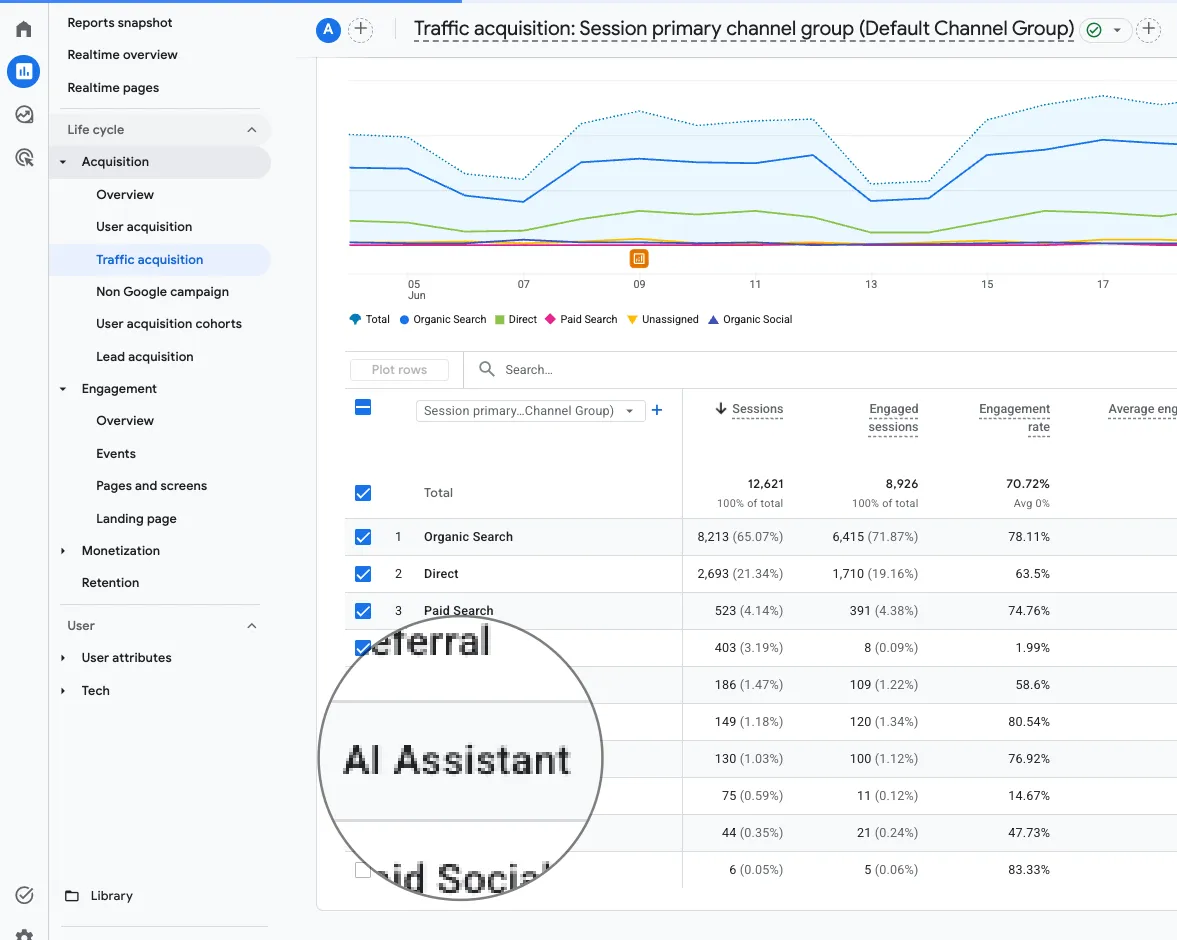
Since May 2026, GA4 labels AI-assistant clicks for you. No custom filters, no regex hacks. When someone clicks in from a supported AI chatbot, GA4 tags:
AI visitors convert 42% better than every other channel (Adobe), and the volume is growing fast. Set this up now, while the signal is small enough to act on.
GA4, step by step
- 1
Open Reports → Acquisition → Traffic acquisition and read the
AI Assistantrow in the Default Channel Group. - 2
Add your key events as a column or comparison to see whether those visits convert.
- 3
For a focused view, build an Exploration filtered to
Session medium = ai-assistantwith a conversion metric.
ai-assistant, are the stable anchors. Use those.What GA4 shows, what it hides
What to look for once it's running
- Which pages AI visitors land on first.
- Which sources convert. ChatGPT traffic can behave nothing like Perplexity.
- Whether AI traffic is growing month over month.
- Pages with high AI referral but low conversion.
- Whether a click came from a live conversation. The page_referrer field captures chatgpt.com/c/... paths.
What it cannot see
- ChatGPT and Claude native apps send no referrer, so those visits land in Direct. Web versions sometimes pass a referrer, but the referrer policy strips it on others. Always a partial picture.
- Long-tail AI tools. Only assistants Google explicitly recognizes appear in the channel report.
- Crawlers. Human clicks only.
The GA4 referrer gap
GA4's AI channel shows you a fraction of the real number. GA4only captures AI visits that arrive with a referrer header intact. In practice, most don't.
of AI-referred traffic lands in Direct. No channel, no source, no conversion data.
Analysis of 446,000 sessions · Loamly, 2026
of what GA4 calls Direct is actually AI-referred traffic.
200-site study · Attrifast, May 2026
GA4's AI Assistant channel is a floor. The real number is materially higher.
The AI Assistant row lives here. Your analytics already has this signal.
Don't wait on Google's list
Match these referrer hostnames in your own channel group to catch custom AI traffic:
Want to skip the setup? Hardal does this automatically.
Get early access →Server-Side
Are crawlers reading your content?
// the part GA4 will never show you. This is your input to the AI engines.
The blind spot
GA4is an incredible tool, but it relies on JavaScript to track visitors. AI crawlers don't run JavaScript. They pull your pages directly from your server.
This means your client-side analytics has never recorded a single AI crawler. To see which AI engines are reading your content, you need to look at your server logs.
Don't worry. You don't need to learn how to query databases or write code. Your engineering team already has this information flowing through your existing infrastructure (Cloudflare, Datadog, AWS, Vercel, Splunk, etc.). You just need to know what to ask them for.
The Marketer's AI Bot Cheat Sheet
Before you ask your team for data, it helps to know what you're looking for. Not all bots do the same thing.
Reading your whole site to build training data. Heavy traffic here means your content is baking into the next version of the model.
Same job as Googlebot. Building a live index so the AI can answer questions right now.
Someone just typed a question. The AI is fetching your exact page right now to build the answer.
The Copy-Paste Slack Request
Drop this exact message to your Web Ops, DevOps, or Data team to get your baseline AI visibility metrics.
Hey team! 👋
I'm doing an audit on our inbound AI visibility. Could we pull a quick report from our server logs for the last 30 days?
I'm looking for the total hit count and the top URLs crawled by these specific User-Agents:
GPTBot, ClaudeBot, PerplexityBot, ChatGPT-User, and OAI-SearchBot.
What to look for in the data
Once your team hands you the report, look for the narrative:
Heavy GPTBot but no ChatGPT-User
OpenAI is training heavily on your website, but users aren't asking about you in live chats yet.
Your Top URLs
Your most-crawled URLs are what AI treats as your most relevant content. Are your key product pages missing from this list? If so, they aren't in contention to be cited by the AI.
//
The Complete Stack
Great alone. Complete together.
GA4is excellent at what it was built for: measuring human visitors, campaigns, and conversions in the browser. Keep it. It's not going anywhere.
But GA4runs on JavaScript. AI crawlers don't execute JavaScript. Every bot training on your content, every agent reading your pricing page, invisible to GA4, visible to Hardal. You don't choose one over the other. You run both.
The Browser Web
Revenue, human conversion rates, campaign performance. GA4 was built for this and it does it well. No reason to replace it, this is its home turf.
The Agentic Web
Bots training on your content. AI agents reading your pricing pages. The “Direct” traffic that's actually coming from ChatGPT. Hardal catches it all, server-side, no JavaScript required.
Keep your GA4. Add Hardal once. See everything.
Hardal AI Visibility
One report. Bots and humans. Always current. Add Hardal once, and your AI traffic, both the invisible crawlers and the human visitors, lands in one report that updates automatically as new bots ship.
See the AI Visibility product page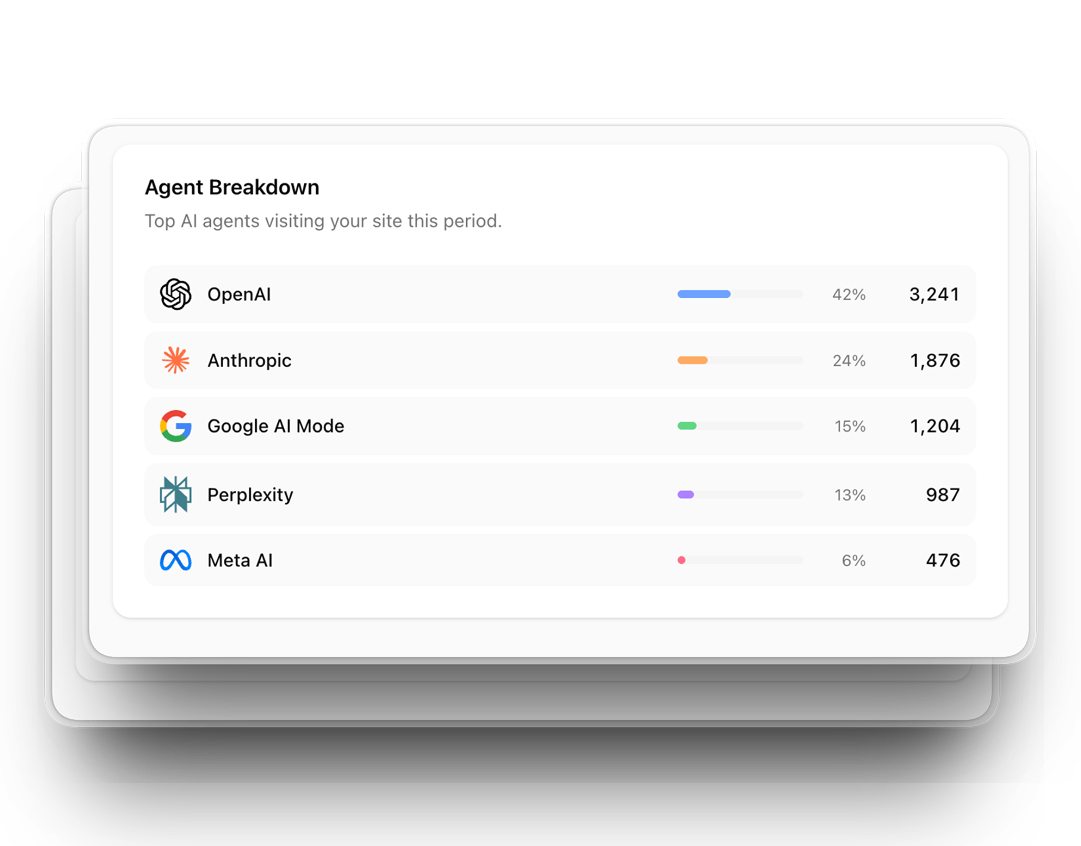
Without Hardal
Manual chaos
Per-platform queries. A user-agent list that breaks every time a new bot ships. Spoofed bots inflating your counts.
With Hardal
One signal, all sources
Built-in IP validation. Bots and humans in one report, giving your GA4 data the complete server-side context it has been missing.
Questions We Get
Frequently asked questions
Does blocking GPTBot hurt my SEO?
No. GPTBot and Googlebot are unrelated. Blocking GPTBot in robots.txt stops OpenAI from training future models on your content, but it has no effect on Google Search rankings. If you still want to be eligible for citations in ChatGPT's live answers, leave OAI-SearchBot allowed. Training and citation are separate switches.
What's the difference between GPTBot and OAI-SearchBot?
GPTBot crawls your site to gather training data for future OpenAI models. OAI-SearchBot crawls to build a live index so ChatGPT can cite your pages in real-time answers, similar to what Googlebot does for Search. You can allow one and block the other in robots.txt.
Why doesn't GA4 show AI crawler traffic?
GA4 relies on a JavaScript tag firing in a browser. AI crawlers request raw HTML directly and never execute JavaScript, so the tag never fires and no session is recorded. That's true even after GA4's AI Assistant channel, added in May 2026, which tracks human clicks from chatbots, not crawls.
How often should I check my AI crawler logs?
At least monthly, next to your regular GA4 and Search Console review. New AI crawlers ship often enough that a check from two quarters ago is already missing bots that are actively reading your site today.
Request Early Access
See your own AI traffic.
AI Visibility is in early access. Run Hardal on your website. See your crawl traffic, the visitors AI sends you, and how both trend, in one report, updated automatically.
You have the playbook, so you are already ahead. Early-access requests from playbook readers go to the front of the queue. 🌭